pushd and popd
Wednesday, 25 December 2013, 20:44
The pushd command can be used to change the current directory and save the directory you came from. Every time the pushd command is executed the origin directory will be pushed on top of the stack that saves the history of origin directories. The popd command will pop the the top directory of the stack and navigate back there. The combination of these two commands can be used in a bat file to change the current directory and go back to the directory the bat file was run from.
An example will show the usage of pushd and popd.
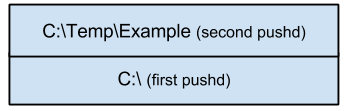
Suppose pushd-popd.bat "C:\Temp\Example" is run from C:\. On line three the stack will be as in the next image. The first popd will navigate back to C:\Temp\Example; and the second popd will navigate back to the directory the bat file was executed from C:\.