Git
Monday, 27 January 2014, 21:47
- Git is a distributed version control system. Version control systems give you the ability to keep track of the entire history of all the files you place under version control. In distributed version control systems everyone who is working on the files under version control has a local copy of the history.
- Typically there is a remote repository, e.g. hosted on GitHub, that acts as the central server from which all users pull the changes made by other users and to which they push the changes they made locally to share them with the other users. This remote repository contains the entire history of all the files it manages.
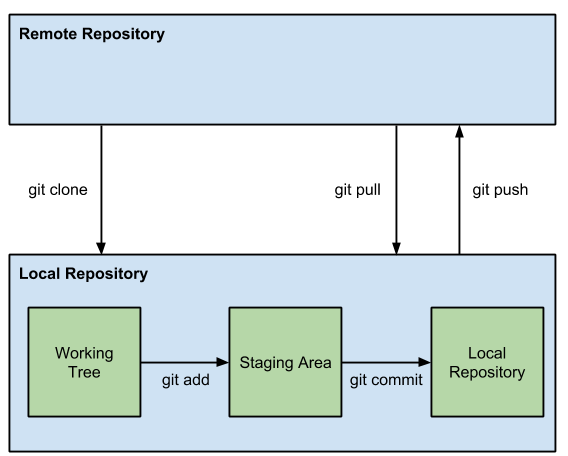
The picture depicted below shows the typical use of Git.
-
As a first step a local copy is made of the remote repository the user wants to collaborate on. This local copy is called a clone. This is done with the following command:
git clone [remote] [local]. -
- The local copy's directory structure is depicted in the next code snippet. The .git folder contains the actual local repository, containing the entire history of the files under version control. All other files and folders form the working tree, this is a snapshot of the most recent version of the files.
- Repositories containing the entire history and a working tree are called non-bare repositories. When only the history is saved, as is often the case in the remote repository, we speak of a bare repository.
-
When the user is editing files he will be manipulating the working tree. Files and folders will be added, deleted and/or modified. When done editing files the status of the working tree can be viewed by running the
git statuscommand. This will show all the changes in the working tree and what can be done with them. -
The changes made in the working tree that are ready to be committed to the local repository are first added to the staging area with the
git add -Acommand. The -A option will also add deletions to the staging area. -
Next the changes in the staging area are committed to the local repository using
git commit -m "[message]". This results in a new snapshot of the all the files under version control in the local repository. After the commit the files are removed from the staging area. Withgit logthe log of all the commits done to the repository can be listed. -
To synchronize all the changes other collaborators made to the remote repository the
git pullcan be executed. To synchronize all the local changes to other collaboratorsgit pushcan be executed to push your local changes to the remote repository.
Some interesting starting points to learn more about git are the git tutorial by Lars Vogel and Git basics on the official Git website.
